
What's the Best Thermostat Setting for Summer?
It's a simple question with a surprisingly impactful answer: what temperature should you set your thermostat to in the summer?
Most people set it to whatever feels comfortable — and then leave it there all day, whether they're home or not. That habit can cost Indianapolis homeowners hundreds of extra dollars each summer.
What Energy Star Recommends
The U.S. Department of Energy and Energy Star both recommend these summer thermostat settings:
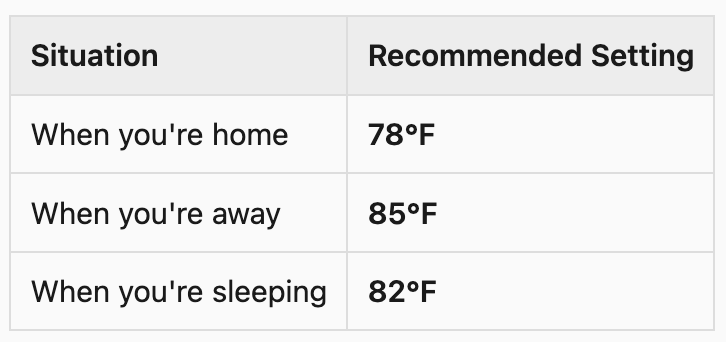
These aren't arbitrary numbers. They represent the balance between comfort and efficiency that minimizes energy use without making your home feel unbearable.
Every degree you lower the thermostat below 78°F increases your cooling costs by approximately 1–3%. Keeping your home at 72°F all day can cost 18–36% more than staying at 78°F.
"But 78°F Feels Hot to Me"
Fair. Thermal comfort is personal — and humidity plays a huge role. In Indiana's humid summers, 78°F with high indoor humidity can feel oppressive, while 78°F with controlled humidity feels perfectly comfortable.
If 78°F feels hot in your home, the issue may not be the temperature setting, it could be:
High indoor humidity (above 50%) making the air feel sticky and warm
Poor airflow from clogged filters or closed vents
Heat entering from windows that could be blocked with curtains or shading
An aging system that's lost efficiency
Addressing those underlying factors often makes 78°F genuinely comfortable without any sacrifice.
The Away Temperature: Why 85°F Makes Sense
Leaving your home at 78°F while you're at work all day is one of the most common and expensive thermostat habits. Your home has no occupants for 8+ hours, but the AC runs constantly to maintain a cool temperature.
Setting it to 85°F while you're away means:
The AC runs far less often
Your home stays protected from extreme heat (nothing over 85°F inside)
You save meaningfully on your monthly bill
With a smart thermostat, you set your schedule once and it automatically adjusts before you arrive home — so you walk into a comfortable 78°F without ever touching a button.
Smart Thermostat vs. Programmable vs. Manual
Manual thermostat: You set the temperature manually every time. No automation. Most people forget to adjust it, leaving it at the comfortable setting 24/7.
Programmable thermostat: You set a schedule (e.g., 78°F 6 AM–8 AM, 85°F 8 AM–5 PM, 78°F 5 PM–10 PM, 82°F overnight). Works well if your schedule is consistent.
Smart thermostat: Learns your schedule, adjusts automatically, can be controlled by phone, and provides energy reports. Google Nest, Ecobee, and Honeywell Home are the leading options. Installation typically costs $150–$250 total.
For most Indianapolis households, a smart thermostat pays for itself in energy savings within 12–18 months.
What About Running the AC at Night?
The 82°F sleeping recommendation often surprises people. But consider: your body temperature drops during sleep, so you naturally need less cooling. A ceiling fan at the right speed can make 82°F feel like 78°F at night with minimal electricity use.
If you prefer it cooler for sleep, try a compromise: set it to 76°F at bedtime and let it rise to 80–82°F around 2 AM when your body is deepest in sleep and least sensitive to heat.
One Setting to Never Use: "On" Fan Mode
Your thermostat likely has two fan settings: "Auto" and "On."
Auto: The fan only runs when the AC is actively cooling. This is the efficient setting.
On: The fan runs continuously, even when the AC isn't cooling. This circulates air but wastes electricity — and can introduce humidity back into your home by blowing air over a slightly wet evaporator coil between cycles.
Keep your fan set to Auto in summer.
Tips for Staying Comfortable at Higher Settings
Run ceiling fans counterclockwise (in summer mode) to feel up to 4°F cooler
Close blinds on south- and west-facing windows during afternoon peak heat
Change your air filter — a clogged filter reduces airflow and makes the home feel stuffy
Check that no furniture is blocking supply or return vents
Want to get your HVAC system running at peak efficiency this summer? CSO Mechanical serves Indianapolis and the surrounding area with honest, professional HVAC service. If your system is struggling to maintain comfortable temperatures at any setting, give us a call.
📞 (317) 372-1608